
Choosing the best iptv player is the single most impactful software decision you will make for your cord-cutting setup. While your IPTV service provider supplies the raw video streams, server bandwidth, and channel lineup, the player application controls everything you see and touch: the smoothness of channel navigation, the responsiveness of your Electronic Program Guide (EPG), audio-video synchronization, and multi-screen sports layouts. A poorly coded player can cause stuttering and crashes, whereas a high-performance player with hardware acceleration turns a modest streaming stick into an interface that rivals commercial cable set-top decoders.
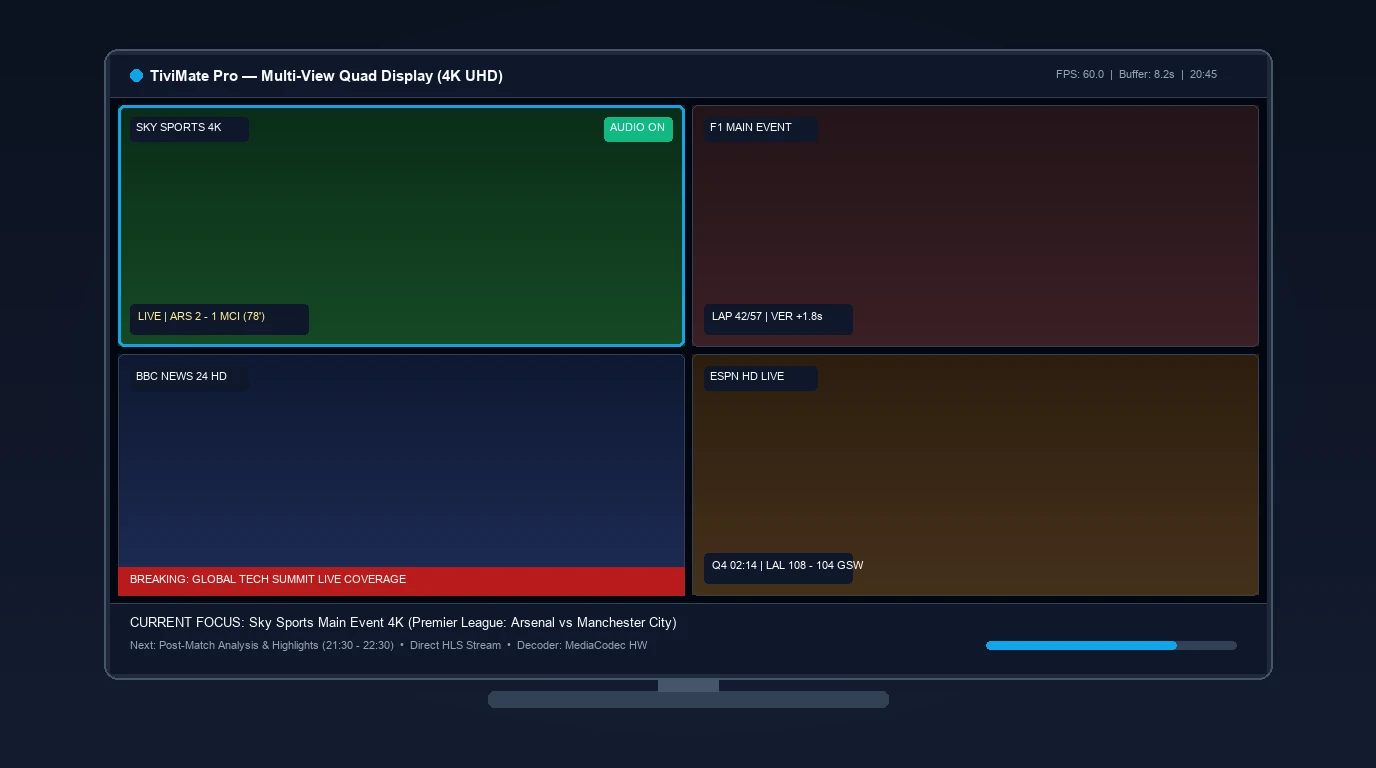
⚡ Quick Summary: Top IPTV Player Picks by Device
For Amazon Firestick and Android TV hardware, TiviMate IPTV Player remains the gold standard with its cable-box EPG guide, multi-view quad screen, and DVR features. For cross-platform households needing iOS, Windows, Mac, or Smart TV support, IPTV Smarters Pro offers the best versatility. Apple TV (tvOS) users should choose IPTVX or iPlayTV. Remember: IPTV players do not provide channels—you must pair them with a verified, high-speed IPTV subscription.
Player App vs. IPTV Provider: The Critical Distinction
Before comparing applications, it is essential to understand how the two halves of an IPTV ecosystem interact.
+-----------------------------------------------------------------------------------------+
|                    THE IPTV ARCHITECTURAL ECOSYSTEM EXPLAINED                           |
+-----------------------------------------------------------------------------------------+
|                                                                                         |
|  [IPTV SERVICE PROVIDER]                                                                |
|  * Maintains streaming origin servers and satellite ingest stations.                   |
|  * Delivers raw HLS / MPEG-TS video chunks over broadband internet.                     |
|  * Issues authentication credentials (M3U Playlist URL or Xtream Codes API).            |
|                                                                                         |
|                                        |                                                |
|                                        v (Stream Transport)                             |
|                                                                                         |
|  [IPTV PLAYER APPLICATION]                                                              |
|  * Installed locally on your streaming hardware (Firestick, Apple TV, Shield).         |
|  * Provides the user interface (UI), channel menus, categories, and EPG TV Guide.       |
|  * Decodes video frames using hardware graphics acceleration (H.264 / HEVC / AV1).      |
|  * DOES NOT INCLUDE CHANNELS OR CONTENT OF ITS OWN.                                     |
|                                                                                         |
+-----------------------------------------------------------------------------------------+
Why Your Player Does Not Include Channels
One of the most common points of confusion for beginners is downloading an app like TiviMate or IPTV Smarters and finding an empty screen. IPTV players are strictly media engines. They contain zero pre-loaded live TV channels, sports events, or on-demand movies. To watch television, you must supply connection credentials obtained from an independent subscription provider.
Decoding Engines: ExoPlayer vs. VLC Core vs. Native Decoders
The underlying playback performance of any best iptv player contender depends on the media engine it employs:
- Google ExoPlayer: The default engine for modern Android TV applications. ExoPlayer offers rapid HLS chunk caching, instant channel switching (zapping time under 1 second), and superior handling of dynamic multi-audio tracks.
- VLC / LibVLC Core: Highly versatile for legacy video formats and niche international codecs. While slightly slower during channel zapping, VLC handles difficult transport streams with unusual interlacing.
- Apple AVPlayer: The native media framework for tvOS and iOS. Delivers unmatched hardware acceleration and thermal efficiency on Apple hardware, but requires servers to output clean, standards-compliant HLS playlists.
In-Depth Reviews of the 7 Best IPTV Players (2026)
1. TiviMate IPTV Player (Top Pick for Firestick & Android TV)
Gold StandardDeveloped by Armobsoft, TiviMate delivers an experience identical to premium commercial set-top decoders. Navigating a 20,000-channel list feels instantaneous, with sub-second channel switching, custom channel grouping, and a fluid Electronic Program Guide.
- Standout Features: Quad-view multi-screen display (up to 9 concurrent feeds), scheduled DVR recording to local USB or Network NAS (SMB), catch-up TV timeline, and multi-playlist aggregation.
- Pricing: Free basic version; Premium license at ~$9.99/year or ~$34.99 lifetime (activates up to 5 devices).
- Compatibility: Fire TV Stick, Google TV, Nvidia Shield, Android TV boxes (Not available on Apple TV or Smart TV OS).
2. IPTV Smarters Pro (Best Cross-Platform Versatility)
Universal SupportIf your household uses a mix of hardware—such as an iPhone in the bedroom, a Firestick in the living room, and a Windows laptop while traveling—IPTV Smarters Pro is the most practical choice. It natively supports Xtream Codes API authentication, automatic EPG downloading, and external player linking.
- Standout Features: Multi-screen quad layout, built-in speed test tool, parental controls, and multi-user login profiles.
- Pricing: Free version available; optional in-app Premium upgrades.
- Compatibility: iOS, Android, macOS, Windows, Samsung Tizen, LG webOS, Fire OS.
3. IPTVX (Premier Apple TV & iOS Interface)
Apple EcosystemWhile Apple TV users cannot install TiviMate, IPTVX fills that void with an application engineered specifically for the Apple ecosystem. It borrows sleek design language from Netflix and Apple TV+, featuring smooth poster artwork caching, automated trailer previews, and iCloud synchronization.
- Standout Features: Picture-in-Picture (PiP), multi-view streaming, Dolby Vision passthrough, and Family Sharing.
- Pricing: Free trial with affordable subscription or lifetime in-app purchases.
- Compatibility: Apple TV 4K (tvOS), iPhone, iPad, macOS.
4. OTT Navigator IPTV (Power Users & Stream Telemetry)
Most CustomizableFor technical enthusiasts who love fine-tuning video decoders, network buffer windows, and audio latency offsets, OTT Navigator is the most configurable player on Android. It offers automated stream failover and live bitrate overlays.
- Standout Features: Live stream diagnostics (bitrate, dropped frames, audio sample rates), dynamic channel grouping, and picture-in-picture.
- Pricing: Free tier; inexpensive premium upgrade.
- Compatibility: Android TV, Fire OS, Android mobile devices.
5. iPlayTV (Lightweight, High-Speed tvOS Player)
Fast & CleanA long-standing favorite in the Apple TV community, iPlayTV focuses on lightning-fast speed and simplicity. It features an intuitive horizontal timeline guide, fast channel switching, and robust XMLTV schedule caching that never bogs down older Apple TV hardware.
- Standout Features: Multi-playlist support, clean category search, and fast EPG caching.
- Pricing: One-time App Store purchase (~$5.99).
- Compatibility: Apple TV (tvOS), iOS.
6. Televizo (Sleek Minimalist Android & Google TV Player)
Low-ResourceTelevizo is a modern, lightweight player gaining massive popularity among Android TV and mobile users. Built with clean Material Design principles, Televizo delivers zero-bloat streaming with rapid loading times, full EPG support, and subtitle customization.
- Standout Features: Low memory footprint (ideal for 1GB/2GB RAM streaming sticks), parental control locks, and external video player support.
- Pricing: Free with optional premium unlock.
- Compatibility: Android TV, Google TV, Fire OS, Android mobile.
7. IBO Player (Best Native Solution for Samsung & LG Smart TVs)
Native Smart TVOwners of Samsung and LG Smart TVs often prefer to avoid purchasing external HDMI streaming sticks. Because Samsung Tizen and LG webOS do not run Android APKs, IBO Player provides fast stream decoding, clean category navigation, and simple web-portal playlist binding via your television’s MAC address.
- Standout Features: Direct installation from official Samsung/LG app stores, fast remote-control zapping, and multi-language support.
- Pricing: 7-day free trial followed by a one-time activation fee (~€8.00).
- Compatibility: Samsung Tizen OS, LG webOS, Android TV, Fire OS.
Comprehensive Comparison: Features, Formats, and Pricing Matrix
| Player Name | Supported Platforms | Multi-View? | EPG Support | Pricing Model |
|---|---|---|---|---|
| TiviMate | Fire TV, Android TV, Google TV | Yes (Up to 9 screens) | Exceptional | Free / $9.99/yr or $34.99 Lifetime |
| IPTV Smarters Pro | iOS, Android, Windows, Mac, LG, Samsung | Yes (Up to 4 screens) | Great | Free / In-app Premium |
| IPTVX | Apple TV (tvOS), iOS, macOS | Yes | Exceptional | Free Trial / Sub or Lifetime |
| OTT Navigator | Android TV, Fire OS, Android Mobile | Yes | Advanced | Free / Affordable Premium |
| iPlayTV | Apple TV (tvOS), iOS | No | Great | One-time ~$5.99 purchase |
| Televizo | Android TV, Fire OS, Android Mobile | No | Great | Free / In-app Premium |
| IBO Player | Samsung Tizen, LG webOS, Android | No | Good | 7-Day Trial / ~€8.00 Lifetime |
Essential Features to Look For in a Modern IPTV Player
XMLTV / GZIP EPG Synchronization
A player without an automated program guide leaves you navigating blind. The best players support compressed XMLTV formats (.xml.gz), refreshing channel schedules in the background so you never see blank “No Information” listings.
Quad Multi-View for Live Sports
For sports enthusiasts, multi-view is transformative. Apps like TiviMate and IPTVX allow you to split your television into 2, 3, or 4 simultaneous windows. Note that streaming 4 games at once requires a provider supporting multi-connection IPTV subscriptions.
Hardware MediaCodec Acceleration
Ensure your player supports GPU hardware acceleration. Offloading HEVC/H.265 video rendering from the central CPU to the graphics processor prevents dropped frames on high-framerate 60 FPS sports streams.
Configurable Buffer Sizing
Home Wi-Fi networks occasionally suffer momentary packet jitter. High-grade players provide a configurable buffer cache setting (5–10 seconds), seamlessly absorbing latency spikes. Learn more in our tutorial on how to fix IPTV buffering and freezing.
Step-by-Step: How to Configure Any IPTV Player with Xtream Codes API
While long M3U playlist URLs remain common, configuring your player with Xtream Codes API credentials provides a faster, more dependable connection:
+-----------------------------------------------------------------------------------------+
|                       XTREAM CODES API CONFIGURATION SEQUENCE                           |
+-----------------------------------------------------------------------------------------+
| 1. Launch your player app and select "Add Playlist" -> Choose "Xtream Codes API".       |
| 2. Server URL: Enter provider domain & port (e.g., http://stream.provider.com:8080).     |
| 3. Username: Enter your assigned account username.                                      |
| 4. Password: Enter your assigned account password.                                      |
| 5. Check "Include VOD": Ensures movies and series libraries are indexed.                |
| 6. Click "Connect / Save": Player downloads category manifests and syncs EPG data.     |
+-----------------------------------------------------------------------------------------+
For step-by-step sideloading walkthroughs on Amazon streaming hardware, follow our step-by-step Firestick IPTV setup guide.
Safety & Performance Warning: The Hazard of “Cracked” Player APKs
Because premium versions of apps like TiviMate require a license, search engines and video portals are filled with links for “TiviMate Premium MOD APK” or “Free Cracked IPTV Smarters.”
Why You Must Avoid Modified Player APKs
- Embedded Backdoors: Modified APKs frequently contain malicious code designed to turn streaming boxes into residential botnet proxies.
- Broken License Verification: Cracked apps break developer update channels, causing video decoders to fail on newer stream formats.
- Credential Theft: Compromised applications can transmit your IPTV subscription username and password to unauthorized third parties.
Frequently Asked Questions About the Best IPTV Players
Which is the best iptv player for Amazon Firestick in 2026?
TiviMate IPTV Player is widely recognized as the premier player for Amazon Firestick devices. Its authentic cable-box guide layout, sub-second channel zapping, quad-screen multi-view capability, and scheduled DVR recording make it the undisputed top choice for living room television viewing.
What is the best iptv player for Apple TV (tvOS)?
Because TiviMate is unavailable on Apple hardware, IPTVX is the highest-rated player for Apple TV 4K. It features an Apple-native user interface, smooth VOD poster art, multi-view streaming, and automatic iCloud synchronization across iPhone, iPad, and Apple TV devices. iPlayTV is a fantastic lightweight alternative.
Can an IPTV player fix buffering from my provider?
A player application cannot fix buffering caused by overloaded, low-bandwidth provider servers. However, a high-quality player with configurable buffer sizing and hardware-accelerated video decoding can eliminate localized stutter, audio desynchronization, and device-level frame drops.
Is TiviMate Premium worth the cost?
Yes. TiviMate Premium unlocks essential daily features including full EPG guide customization, multiple playlist aggregation, scheduled recording to local or network drives, parental controls, and multi-view split-screen viewing. For anyone who watches television regularly on an Android TV or Firestick, it is well worth the investment.
Do any IPTV players come with free live TV channels included?
No. Legitimate IPTV players (such as TiviMate, IPTV Smarters, and OTT Navigator) are strictly standalone software media engines. They do not supply, host, or link to any content. To watch live channels, you must subscribe to an independent IPTV provider and input your own M3U or Xtream Codes credentials into the application.
Final Verdict: Which IPTV Player Should You Choose?
Your choice of the best iptv player comes down to your operating hardware and feature preferences:
- If you stream on an Amazon Firestick, Google TV, or Nvidia Shield, install TiviMate. There is no other player on the Android ecosystem that matches its speed, polish, and cable-grade television guide.
- If you need a single application that works everywhere—including iPhones, Android phones, Windows PCs, and Samsung or LG Smart TVs—use IPTV Smarters Pro.
- If you live inside the Apple ecosystem with an Apple TV 4K, invest in IPTVX.
Remember that even the most advanced player application is only as good as the stream source powering it. To experience true 60 FPS sports, crystal-clear 4K video, and reliable 99.9% uptime, pair your player with an infrastructure-backed subscription built on dedicated edge servers. Explore our ranking of the best IPTV providers ranked for stability to find the ideal subscription.
Ready to Power Your IPTV Player with Stable 4K Streams?
Connect your favorite player app (TiviMate, Smarters, IPTVX) to 25,000+ live channels, 60 FPS sports, and 120,000+ movies on dedicated edge CDN infrastructure.